安装部署25 分钟阅读
海量 Vastbase G100 V2.2.15 安装部署手册
大家好,这里是 DBA 学习之路,专注于提升数据库运维效率。 @TOC目录 上周海量数据开展了一个《海量数据Vastbase数据公开课》,参与人数不少,我有幸获得了 VCA 的「免费认证考试资格」,课程培训大纲如下: V
2025年6月9日阅读—点赞—收藏—
database
在知识库中专注阅读,并随时返回相关工具与课程
大家好,这里是 DBA 学习之路,专注于提升数据库运维效率。 @TOC目录 上周海量数据开展了一个《海量数据Vastbase数据公开课》,参与人数不少,我有幸获得了 VCA 的「免费认证考试资格」,课程培训大纲如下: V
大家好,这里是 DBA 学习之路,专注于提升数据库运维效率。
本章目标:掌握本章核心知识点 前置要求:完成前序章节学习 预计时长:60 分钟
上周海量数据开展了一个《海量数据Vastbase数据公开课》,参与人数不少,我有幸获得了 VCA 的「免费认证考试资格」,课程培训大纲如下:

VCA 认证已考:

本文主要记录 Vastbase G100 V2.2.15 的安装步骤以及经验总结,让大家更容易安装 Vastbase,安装过程很丝滑。
Vastbase G100 是海量数据基于开源 openGauss 内核开发的企业级关系型数据库,旨在提供强竞争力的事务型、集中式高可用数据库。
Vastbase G100 是集中式数据库系统,在这样的系统架构中,业务数据存储在单个物理节点上,数据访问任务被推送到服务节点执行,通过服务器的高并发,实现对数据处理的快速响应。同时通过日志复制可以把数据复制到备机,提供数据的高可靠和读扩展。
Vastbase支持单机安装和高可用集群两种部署方式:
本文演示环境配置如下:
检查操作系统版本信息:
1[root@vastbase ~]# cat /etc/os-release 2NAME="openEuler"3VERSION="22.03 (LTS-SP3)"4ID="openEuler"5VERSION_ID="22.03"6PRETTY_NAME="openEuler 22.03 (LTS-SP3)"7ANSI_COLOR="0;31"为确保 Vastbase 的正常使用,需禁用防火墙:
1[root@vastbase ~]# systemctl stop firewalld.service 2[root@vastbase ~]# systemctl disable firewalld.service 3Removed /etc/systemd/system/multi-user.target.wants/firewalld.service.4Removed /etc/systemd/system/dbus-org.fedoraproject.FirewallD1.service.建议关闭 SELNUX,防止造成一些不必要的问题:
1## 这里使用 setenforce 0 临时生效2[root@vastbase ~]# /usr/sbin/setenforce 03[root@vastbase ~]# sed -i 's/SELINUX=enforcing/SELINUX=disabled/g' /etc/selinux/config4[root@vastbase ~]# sestatus5SELinux status: enabled6SELinuxfs mount: /sys/fs/selinux7SELinux root directory: /etc/selinux8Loaded policy name: targeted9Current mode: permissive10Mode from config file: disabled11Policy MLS status: enabled12Policy deny_unknown status: allowed13Memory protection checking: actual (secure)14Max kernel policy version: 33可以看到 Mode from config file 是 disabled,代表已经禁用 selinux。
需要提前配置 YUM 源,可参考文章:DBA 必备:Linux 软件源配置全攻略
1## 挂载本地 ISO 镜像2[root@vastbase ~]# mount /dev/sr0 /mnt/3mount: /mnt: WARNING: source write-protected, mounted read-only.4## 备份系统初始配置文件5[root@vastbase ~]# mkdir -p /etc/yum.repos.d/bak6[root@vastbase ~]# mv /etc/yum.repos.d/* /etc/yum.repos.d/bak7## 一键配置软件源,默认 ISO 安装镜像挂载在 /mnt 目录下8[root@vastbase ~]# cat <<-EOF > /etc/yum.repos.d/local.repo9[openEuler]10name=openeuler11baseurl=file:///mnt12enabled=113gpgcheck=114gpgkey=file:///mnt/RPM-GPG-KEY-openEuler15EOF安装 Vastbase G100 数据库的基础依赖包如下:
1[root@vastbase ~]# yum install -y zlib-devel libaio libuuid readline-devel krb5-libs libicu libxslt tcl perl openldap pam openssl-devel libxml2 bzip2在 openEuler x86 环境中需要安装 libnsl:
1[root@vastbase ~]# yum install -y libnsl检查是否安装成功:
1[root@vastbase ~]# rpm -q zlib-devel libaio libuuid readline-devel krb5-libs libicu libxslt tcl perl openldap pam openssl-devel libxml2 bzip2 libnsl2zlib-devel-1.2.11-24.oe2203sp3.x86_643libaio-0.3.113-9.oe2203sp3.x86_644libuuid-2.37.2-23.oe2203sp3.x86_645readline-devel-8.1-3.oe2203sp3.x86_646krb5-libs-1.19.2-11.oe2203sp3.x86_647libicu-72.1-6.oe2203sp3.x86_648libxslt-1.1.37-1.oe2203sp3.x86_649tcl-8.6.12-4.oe2203sp3.x86_6410perl-5.34.0-13.oe2203sp3.x86_6411openldap-2.6.0-7.oe2203sp3.x86_6412pam-1.5.2-6.oe2203sp3.x86_6413openssl-devel-1.1.1wa-2.oe2203sp3.x86_6414libxml2-2.9.14-9.oe2203sp3.x86_6415bzip2-1.0.8-6.oe2203sp3.x86_6416libnsl-2.34-143.oe2203sp3.x86_64数据库默认时区为中国时区,如果操作系统时区和数据库默认时区不一致,会导致数据库日志显示时间和实际时间不一致。可通过以下命令查看操作系统当前的时区:
1[root@vastbase ~]# timedatectl 2 Local time: Mon 2025-06-09 13:46:36 CST3 Universal time: Mon 2025-06-09 05:46:36 UTC4 RTC time: Mon 2025-06-09 05:46:365 Time zone: Asia/Shanghai (CST, +0800)6System clock synchronized: no7 NTP service: inactive8 RTC in local TZ: no返回结果如上表示时区正常。
systemd-logind 服务中引入的一个特性 RemoveIPC,会造成程序信号丢失等问题,只有Redhat7 及以上和一些特殊的国产Linux的版本需要修改,改之前可先查看此项是否为默认yes),需要设置 RemoveIPC=no:
1[root@vastbase ~]# sed -i 's/#RemoveIPC=no/RemoveIPC=no/' /etc/systemd/logind.conf2[root@vastbase ~]# grep RemoveIPC /etc/systemd/logind.conf3RemoveIPC=no这里有个坑,安装过程中是检测 /usr/lib/systemd/system/systemd-logind.service 文件中是否有 RemoveIPC=no 配置的:

所以还要配置 /usr/lib/systemd/system/systemd-logind.service 文件:
1[root@vastbase ~]# vi /usr/lib/systemd/system/systemd-logind.service23## 在 [Service] 最后加上 RemoveIPC=no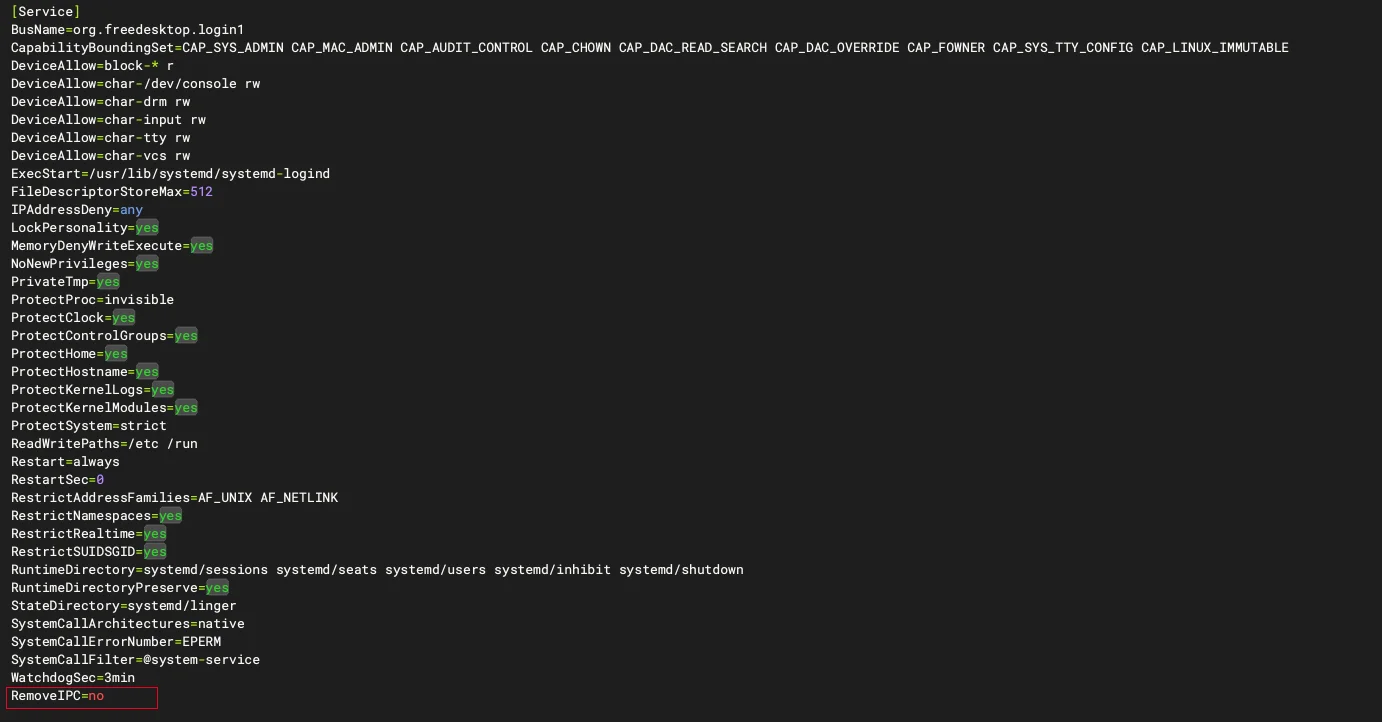
重新加载 systemd 守护进程并重启 systemd-logind 服务生效:
1[root@vastbase ~]# systemctl daemon-reload2[root@vastbase ~]# systemctl restart systemd-logind修改后检查是否生效:
1[root@vastbase ~]# loginctl show-session | grep RemoveIPC2RemoveIPC=no3[root@vastbase ~]# systemctl show systemd-logind | grep RemoveIPC4RemoveIPC=no透明大页可能会对数据库性能产生负面影响,建议关闭透明大页:
1[root@vastbase ~]# cat /sys/kernel/mm/transparent_hugepage/enabled2[always] madvise never显示结果:
修改 /etc/default/grub 文件,在 GRUB_CMDLINE_LINUX 中添加或修改参数 transparent_hugepage=never:
1[root@vastbase ~]# sed -i 's/quiet/quiet transparent_hugepage=never/' /etc/default/grub通过以下指令检查当前系统的引导类型:
1[root@vastbase ~]# [ -d /sys/firmware/efi ] && echo UEFI || echo BIOS2BIOS两种引导的启动文件路径分别为:
执行 grub2–mkconfig 指令重新配置 grub.cfg:
1## BIOS 引导2# grub2-mkconfig -o /boot/grub2/grub.cfg3## UEFI 引导4# grub2-mkconfig -o /boot/efi/EFI/<distro_name>/grub.cfg56[root@vastbase ~]# grub2-mkconfig -o /boot/grub2/grub.cfg7Generating grub configuration file ...8Found linux image: /boot/vmlinuz-5.10.0-182.0.0.95.oe2203sp3.x86_649Found initrd image: /boot/initramfs-5.10.0-182.0.0.95.oe2203sp3.x86_64.img10Found linux image: /boot/vmlinuz-0-rescue-39cd0fedff3b4d4ea197a52f0c9a679411Found initrd image: /boot/initramfs-0-rescue-39cd0fedff3b4d4ea197a52f0c9a6794.img12Adding boot menu entry for UEFI Firmware Settings ...13done重启操作系统,使配置永久生效:
1[root@vastbase ~]# reboot验证透明大页已关闭:
1[root@vastbase ~]# cat /sys/kernel/mm/transparent_hugepage/enabled2always madvise [never]结果应显示 always madvise [never]。
编译内核参数配置文件/etc/sysctl.conf,将内核信息写入文件末尾:
1# 物理内存(KB)2os_memory_total=$(awk '/MemTotal/{print $2}' /proc/meminfo)3# 获取系统页面大小,用于计算内存总量4pagesize=$(getconf PAGE_SIZE)5((shmall = (os_memory_total - 1) * 1024 / pagesize))6((shmmax = os_memory_total * 1024 - 10))7# 如果 shmall 小于 2097152,则将其设为 20971528((shmall < 2097152)) && shmall=20971529# 如果 shmmax 小于 4294967295,则将其设为 429496729510((shmmax < 4294967295)) && shmmax=4294967295复制以上命令,直接执行即可计算得出这两个参数值:
1[root@vastbase ~]# echo $shmall239644113[root@vastbase ~]# echo $shmmax416238231542根据官方建议值,配置系统参数文件:
1[root@vastbase ~]# cat<<-EOF>>/etc/sysctl.conf2fs.aio-max-nr=10485763fs.file-max= 767246004kernel.sem = 4096 2097152000 4096 5120005kernel.shmall = 39644116kernel.shmmax = 162382315427kernel.shmmni = 8192008net.core.netdev_max_backlog = 100009net.core.rmem_default = 26214410net.core.rmem_max = 419430411net.core.wmem_default = 26214412net.core.wmem_max = 419430413net.core.somaxconn = 409614net.ipv4.tcp_fin_timeout = 515vm.dirty_background_bytes = 409600000 16vm.dirty_expire_centisecs = 300017vm.dirty_ratio = 8018vm.dirty_writeback_centisecs = 5019vm.overcommit_memory = 020vm.swappiness = 021net.ipv4.ip_local_port_range = 40000 6553522fs.nr_open = 2048000023EOF2425## 生效配置26[root@vastbase ~]# sysctl -p将部分资源限制值(使用 ulimit -a 可查看所有的资源限制值)调整为推荐值或以上。
1cat<<-EOF>>/etc/security/limits.conf2vastbase soft nproc unlimited3vastbase hard nproc unlimited4vastbase soft stack unlimited5vastbase hard stack unlimited6vastbase soft core unlimited7vastbase hard core unlimited8vastbase soft memlock unlimited9vastbase hard memlock unlimited10vastbase soft nofile 102400011vastbase hard nofile 102400012EOF如果有密码复杂性要求,不想设置密码太复杂的话,可以取消密码复杂度:
1[root@vastbase ~]# sed -i 's/^password\+[[:space:]]\+requisite[[:space:]]\+pam_pwquality.so/#&/g' /etc/pam.d/system-auth2[root@vastbase ~]# sed -i 's/use_authtok$//' /etc/pam.d/system-auth创建 vastbase 用户:
1[root@vastbase ~]# useradd -d /home/vastbase -m vastbase2[root@vastbase ~]# echo "vastbase:vastbase" | chpasswd3[root@vastbase ~]# id vastbase4uid=1001(vastbase) gid=1001(vastbase) groups=1001(vastbase)创建安装所需目录并且授权:
1[root@vastbase ~]# mkdir -p /vastdata/app/vastbase/2.2.15 /vastdata/data/vastbase2[root@vastbase ~]# chown -R vastbase:vastbase /vastdata3[root@vastbase ~]# chmod -R 775 /vastdata创建 /soft 目录存放安装包:
1[root@vastbase ~]# mkdir /soft
授予 vastbase 用户权限,解压安装包:
1[root@vastbase soft]# chown -R vastbase:vastbase /soft2[root@vastbase soft]# chmod -R 775 /soft/3[root@vastbase soft]# su - vastbase4[vastbase@vastbase:/home/vastbase]$ cd /soft/5[vastbase@vastbase:/soft]$ tar -xf Vastbase-installer-2.2_Build15-openEuler_22.03sp3-x86_64.tar.gzinstaller 安装是使用标准安装包进行部署的推荐方式。对于首次安装 Vastbase,建议使用交互式安装,该方式通过脚本引导用户完成各种配置选择,操作简洁直观。
切换到数据库安装用户vastbase 执行安装:
1[vastbase@vastbase:/soft]$ cd vastbase-installer/2[vastbase@vastbase:/soft/vastbase-installer]$ ./vastbase_installer以下为安装过程:
1===============================================================================23Welcome to the installation tool (V1.0) and start installing Vastbase.45===============================================================================6Check whether the installation package is complete7---------------89ok10===============================================================================1112Type <Enter> to continue: 1314===============================================================================15System configuration information16---------------1718Operation System : openEuler 22.03 (LTS-SP3)19 CPU cores: 820 Memory size : 15485 MB21Current user name: vastbase2223Type <Enter> to continue: 2425===============================================================================26Dependency check27---------------2829 readline : 8.130 libicu : 72.131 cracklib : 2.9.832 libxslt : 1.1.3733 tcl : 8.6.1234 perl : 5.34.035 openldap : 2.6.036 pam : 1.5.237systemd-libs : 24938 bzip2 : 1.0.839 gettext : 0.21.140 libaio : 0.3.11341ncurses-libs : 6.342 python2 : 3.9.94344Type <Enter> to continue: 4546------------------47Preparing the installation environment...4849Finish to prepare the installation environment50===============================================================================51IPC parameter check52---------------5354The IPC parameter check is complete55===============================================================================56Install database57---------------5859Whether to instantiate the database (Y/N): Y6061Select installation type6263Typical installation : Use default parameters to init database64Custom installation : Configure installation parameters and functions manually6566 -> 1- Typical installation67 2- Custom installation6869Select the installation type, or type <Enter> to select the default (1):70271===============================================================================72Database Initialization User Password (Press the backspace key to go back)73---------------7475Enter the password of database initialization user (vastbase): ***********7677Please enter your password again: ***********7879===============================================================================80Database encryption key(PGENCRYPTIONKEY)81---------------8283Set database encryption key(PGENCRYPTIONKEY): 8485 -> 1- Use the database initialization password (default)86 2- Enter the encryption key manually8788Select the database encryption key setting, or type <Enter> to select the default(1):89===============================================================================90Vastbase installation directory91---------------9293Vastbase installation directory94 Default location: /home/vastbase/local/vastbase9596Type the absolute path (ctrl+ backspace to backspace), or type <Enter> to use the default path :9798/vastdata/app/vastbase/2.2.15 99===============================================================================100Database initialization directory101---------------102103Select the database initialization directory Default location: /home/vastbase/data/vastbase104105Type the absolute path (ctrl+ backspace to backspace), or type <Enter> to use the default path :106/vastdata/data/vastbase107===============================================================================108listener port109---------------110111Enter the listening port, or type <Enter> to select the default (5432):112113===============================================================================114Max Connections115---------------116117118Enter the maximum number of client connections, or type <Enter> to select the default (500):1191500120===============================================================================121Shared buffers122---------------123124Enter the shared memory size in MB, or enter <Enter> to select the default (3871):125126===============================================================================127Database compatibility mode128---------------129130Specify the database compatibility mode (A|B|PG|MSSQL)131132Default compatibility:A133134Type compatibility above or <Enter> to use the default value135136137===============================================================================138Check disk IO scheduling algorithm139---------------140141The disk IO scheduling algorithm to which directory /vastdata/data/vastbase belongs is being checked142143The scheduling algorithm of disk IO is checked144===============================================================================145Installation summary146---------------147148Vastbase installation directory:149 /vastdata/app/vastbase/2.2.15150151Vastbase directory:152 /vastdata/data/vastbase153154Database initialization user :155 vastbase156157Database initialization parameter :158 listen_addresses='*'159 port=5432160 max_connections=1500161 shared_buffers=3871MB162 max_process_memory=10297MB163 work_mem=4MB164165166Type <Enter> to continue: 167168169Installation underway, please wait...170Initialize database successfully, data directory :/vastdata/data/vastbase171172The default passwords of the three default database administrators vbaudit, vbsso, and vbadmin are:173system admin[vbadmin] initial password: C58d6(6f174security admin[vbsso] initial password: Cf4f4(89175audit admin[vbaudit] initial password: X2b15!5c176177Generate the encryption key file178The encryption key file is generated successfully179180The configuration file /vastdata/data/vastbase/postgresql.conf was successfully updated181182Writing configuration file183184Writing cluster_config.xml file185186Writing environment variables187The configuration file:'/home/vastbase/.bashrc' is successfully updated188===============================================================================189Installation complete190---------------191192Specify the license path first (if the license path is incorrect, the database fails to start):193 Write the license path to file /vastdata/data/vastbase/postgresql.conf in the form of license_path='license path'194195To initialize the database running environment:196 source ~/.bashrc197198To start, stop, and restart the database:199 vb_ctl <start/stop/restart>200201202If the installation is complete, Enter <Enter> to exit:安装过程中的三个默认管理员账户密码请妥善保管:
C58d6(6fCf4f4(89X2b15!5c数据库安装完成后,会自动配置环境变量:
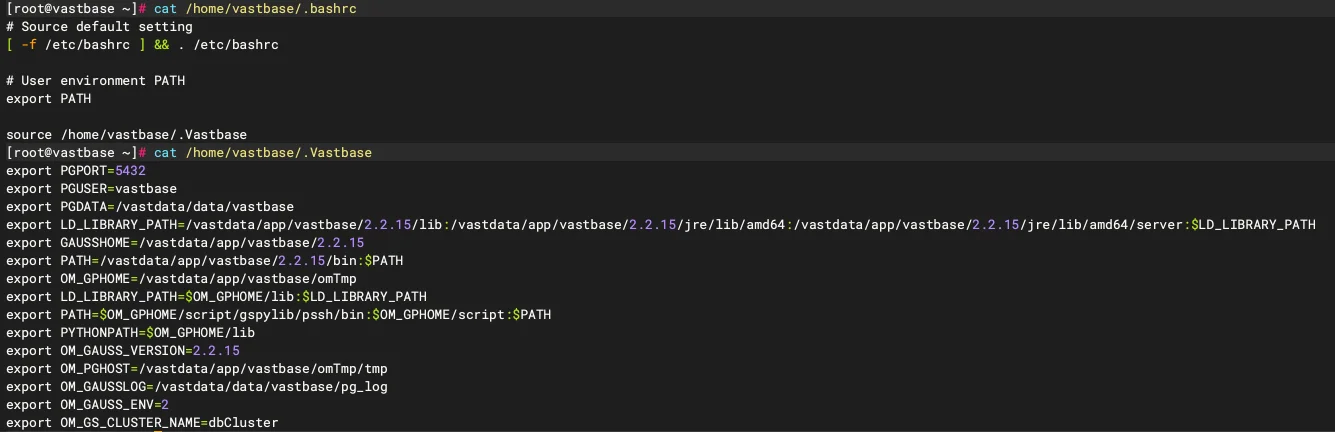
根据提示,先后执行 source ~/.bashrc 和 vb_ctl start 即可启动数据库:
1[vastbase@vastbase:/home/vastbase]$ source ~/.bashrc2[vastbase@vastbase:/home/vastbase]$ vb_ctl status3[2025-06-09 14:49:10.434][8567][][vb_ctl]: vb_ctl status,datadir is /vastdata/data/vastbase 4no server running启动数据库报错:
1[vastbase@vastbase:/home/vastbase]$ vb_ctl start2[2025-06-09 14:55:36.611][9962][][vb_ctl]: vb_ctl started,datadir is /vastdata/data/vastbase 3[2025-06-09 14:55:36.664][9962][][vb_ctl]: waiting for server to start...45...6...7...892025-06-09 14:55:36.781 [unknown] [unknown] localhost 139661589746176 0[0:0#0] 0 [BACKEND] LOG: reserved memory for backend threads is: 220 MB102025-06-09 14:55:36.781 [unknown] [unknown] localhost 139661589746176 0[0:0#0] 0 [BACKEND] LOG: reserved memory for WAL buffers is: 128 MB112025-06-09 14:55:36.781 [unknown] [unknown] localhost 139661589746176 0[0:0#0] 0 [BACKEND] LOG: Set max backend reserve memory is: 348 MB, max dynamic memory is: 1917 MB122025-06-09 14:55:36.781 [unknown] [unknown] localhost 139661589746176 0[0:0#0] 0 [BACKEND] LOG: shared memory 7519 Mbytes, memory context 2265 Mbytes, max process memory 10297 Mbytes132025-06-09 14:55:36.781 [unknown] [unknown] localhost 139661589746176 0[0:0#0] 0 [BACKEND] FATAL: the values of memory out of limit, the database failed to be started, max_process_memory (10297MB) must greater than 2GB + cstore_buffers(512MB) + (udf_memory_limit(200MB) - UDF_DEFAULT_MEMORY(200MB)) + shared_buffers(3871MB) + preserved memory(3996MB) = 10427MB, reduce the value of shared_buffers, max_pred_locks_per_transaction, max_connection, wal_buffers, max_wal_senders, wal_receiver_buffer_size..etc will help reduce the size of preserved memory142025-06-09 14:55:36.784 [unknown] [unknown] localhost 139661589746176 0[0:0#0] 0 [BACKEND] LOG: FiniNuma allocIndex: 0.15[2025-06-09 14:55:37.666][9962][][vb_ctl]: waitpid 9965 failed, exitstatus is 256, ret is 21617[2025-06-09 14:55:37.666][9962][][vb_ctl]: stopped waiting18[2025-06-09 14:55:37.666][9962][][vb_ctl]: could not start server19Examine the log output.分析报错是因为内存参数设置过大,需要修改配置文件 /vastdata/data/vastbase/postgresql.conf 中以下几个参数值:
1wal_buffers = 32MB2shared_buffers=512MB3max_connections=1004max_process_memory=6144MB5cstore_buffers = 32MB修改后再次启动数据库:
1[vastbase@vastbase:/home/vastbase]$ vb_ctl start2[2025-06-09 15:01:37.346][10751][][vb_ctl]: vb_ctl started,datadir is /vastdata/data/vastbase 3[2025-06-09 15:01:37.403][10751][][vb_ctl]: waiting for server to start...45...6...7...890 LOG: License info: Customer:'temporary license', Begins On:'2025-06-09 14:41:51', Expires On:'2025-09-07 14:41:51', MAC:'' 1011...12...13...1415[2025-06-09 15:01:38.416][10751][][vb_ctl]: done16[2025-06-09 15:01:38.416][10751][][vb_ctl]: server started (/vastdata/data/vastbase)启动成功,查看数据库状态:
1[vastbase@vastbase:/home/vastbase]$ vb_ctl status2[2025-06-09 15:01:54.074][10919][][vb_ctl]: vb_ctl status,datadir is /vastdata/data/vastbase 3vb_ctl: server is running (PID: 10754)4/vastdata/app/vastbase/2.2.15/bin/vastbase在最新版本的 Vastbase 数据库安装软件种已经预置了免费试用功能、默认无 license 场景下也可以免费使用 Vastbase 数据库一段时间。但是如果试用到期、仍未添加有效 license 则数据库实例无法启动。
替换 License 许可:
1[vastbase@vastbase:/home/vastbase]$ cat<<-EOF>>/vastdata/data/vastbase/postgresql.conf2license_path='/soft/Vastbase_G100_license_20250731'3EOF重新启动数据库:
1[vastbase@vastbase:/home/vastbase]$ vb_ctl restart2[2025-06-09 15:06:32.159][11502][][vb_ctl]: vb_ctl restarted ,datadir is /vastdata/data/vastbase 3waiting for server to shut down... done4server stopped56...7...8...9100 LOG: License info: Customer:'Vastbase', Begins On:'2025-02-06 09:39:51', Expires On:'2025-07-31 09:42:46', MAC:'' 1112...13...14...1516[2025-06-09 15:06:35.622][11502][][vb_ctl]: done17[2025-06-09 15:06:35.622][11502][][vb_ctl]: server started (/vastdata/data/vastbase)替换完 license 之后还比免费的时间还短,哈哈。
数据库启动后使用 vastbase 用户,使用下面的命令登录数据库:
1[vastbase@vastbase:/home/vastbase]$ vsql -r -d vastbase
至此,Vastbase 数据库安装完成 ✅。