运维管理30 分钟阅读
【纯干货】Oracle 19C RU 19.27 发布,如何快速升级和安装?
大家好,这里是公众号 DBA学习之路,分享一些学习数据库路上的知识和经验。 @TOC目录 前几天 19.27 补丁发布了,一直没时间安装测试,今天正好有空,测试一下。 Oracle 19C RU 每季度更新一次,本次 1
2025年4月18日阅读—点赞—收藏—
oraclerac
在知识库中专注阅读,并随时返回相关工具与课程
大家好,这里是公众号 DBA学习之路,分享一些学习数据库路上的知识和经验。 @TOC目录 前几天 19.27 补丁发布了,一直没时间安装测试,今天正好有空,测试一下。 Oracle 19C RU 每季度更新一次,本次 1
大家好,这里是公众号 DBA学习之路,分享一些学习数据库路上的知识和经验。

前几天 19.27 补丁发布了,一直没时间安装测试,今天正好有空,测试一下。
Oracle 19C RU 每季度更新一次,本次 19.27 对应 202504 季度:

这里顺带分享一下几个 MOS 补丁的下载链接:
最近 MOS 增加了双重认证,很多小伙伴的 MOS 账号都无法登录下载了,Oracle 这一手太坏了。
环境信息:
为了方便,直接使用 Oracle 一键安装脚本创建测试环境,目前脚本已经开源,需要下载使用的朋友可以直接访问:
下载后即可使用。
为了演示补丁安装,使用 Oracle 一键安装脚本快速安装一套 Oracle 19C 无补丁测试环境:
1[root@oel8 ~]# cd /soft/2[root@oel8 soft]# ./OracleShellInstall -lf ens33 `# local ip ifname`\3-n oel8 `# hostname`\4-op oracle `# oracle password`\5-d /u01 `# software base dir`\6-ord /oradata `# data dir`\7-o orclcdb `# dbname`\8-pdb lucifer `# pdbname`\9-dp oracle `# sys/system password`\10-ds AL32UTF8 `# database character`\11-ns AL16UTF16 `# national character`\12-redo 100 `# redo size`\13-opd Y `# optimize db`默认使用专业版脚本。脚本下载:ora100.com/shell-install 一键安装过程如下:
1 ███████ ██ ████████ ██ ██ ██ ██ ██ ██ ██2 ██░░░░░██ ░██ ██░░░░░░ ░██ ░██ ░██░██ ░██ ░██ ░██3 ██ ░░██ ██████ ██████ █████ ░██ █████ ░██ ░██ █████ ░██ ░██░██ ███████ ██████ ██████ ██████ ░██ ░██4░██ ░██░░██░░█ ░░░░░░██ ██░░░██ ░██ ██░░░██░█████████░██████ ██░░░██ ░██ ░██░██░░██░░░██ ██░░░░ ░░░██░ ░░░░░░██ ░██ ░██5░██ ░██ ░██ ░ ███████ ░██ ░░ ░██░███████░░░░░░░░██░██░░░██░███████ ░██ ░██░██ ░██ ░██░░█████ ░██ ███████ ░██ ░██6░░██ ██ ░██ ██░░░░██ ░██ ██ ░██░██░░░░ ░██░██ ░██░██░░░░ ░██ ░██░██ ░██ ░██ ░░░░░██ ░██ ██░░░░██ ░██ ░██7 ░░███████ ░███ ░░████████░░█████ ███░░██████ ████████ ░██ ░██░░██████ ███ ███░██ ███ ░██ ██████ ░░██ ░░████████ ███ ███8 ░░░░░░░ ░░░ ░░░░░░░░ ░░░░░ ░░░ ░░░░░░ ░░░░░░░░ ░░ ░░ ░░░░░░ ░░░ ░░░ ░░ ░░░ ░░ ░░░░░░ ░░ ░░░░░░░░ ░░░ ░░░ 91011注意:本脚本仅用于新服务器上实施部署数据库使用,严禁在已运行数据库的主机上执行,以免发生数据丢失或者损坏,造成不可挽回的损失!!! 1213请选择安装模式 [单机(si)/单机ASM(sa)/集群(rac)] : si1415数据库安装模式: single 1617请选择数据库版本 [11|12|19|21|23] : 191819数据库版本: 19 2021OracleShellInstall 开始安装,详细安装过程可查看日志: tail -2000f /soft/print_shell_install_20250418112608.log 2223正在进行安装前检查,请稍等...... 2425正在检测安装包 /soft/LINUX.X64_193000_db_home.zip 的 MD5 值是否正确,请稍等...... 2627正在配置本地软件源......已完成 (耗时: 0 秒)28正在获取操作系统信息......已完成 (耗时: 1 秒)29正在安装依赖包......已完成 (耗时: 101 秒)30正在禁用防火墙......已完成 (耗时: 1 秒)31正在禁用 selinux......已完成 (耗时: 1 秒)32正在配置 nsyctl......已完成 (耗时: 0 秒)33正在配置主机名和 hosts 文件......已完成 (耗时: 0 秒)34正在创建用户和组......已完成 (耗时: 1 秒)35正在创建安装目录......已完成 (耗时: 1 秒)36正在配置 Avahi-daemon 服务......已完成 (耗时: 1 秒)37正在配置透明大页 && NUMA && 磁盘 IO 调度器......已完成 (耗时: 2 秒)38正在配置操作系统参数 sysctl......已完成 (耗时: 2 秒)39正在配置 RemoveIPC......已完成 (耗时: 1 秒)40正在配置用户限制 limit......已完成 (耗时: 1 秒)41正在配置 shm 目录......已完成 (耗时: 1 秒)42正在安装 rlwrap 插件......已完成 (耗时: 11 秒)43正在配置用户环境变量......已完成 (耗时: 1 秒)44正在解压 Oracle 安装包以及补丁......已完成 (耗时: 62 秒)45正在安装 Oracle 软件以及补丁......已完成 (耗时: 88 秒)46正在创建监听......已完成 (耗时: 2 秒)47正在创建数据库......已完成 (耗时: 988 秒)48正在优化数据库......已完成 (耗时: 23 秒)4950恭喜!Oracle 一键安装执行完成 (耗时: 1295 秒),现在是否重启主机:[Y/N] Y5152正在重启当前节点主机......默认使用专业版脚本。脚本下载:ora100.com/shell-install 安装好的环境为 19C 无补丁数据库版本:
1[oracle@oel8:/home/oracle]$ sqlplus -V23SQL*Plus: Release 19.0.0.0.0 - Production4Version 19.3.0.0.056[oracle@oel8:/home/oracle]$ opatch lspatches729585399;OCW RELEASE UPDATE 19.3.0.0.0 (29585399)829517242;Database Release Update : 19.3.0.0.190416 (29517242)910OPatch succeeded.下面演示一下 Oracle 19C RU 19.27 补丁的安装步骤。
首先需要查看补丁的 README 文件(解压补丁后即可获得),其中补丁的前置要求如下:
翻译一下就是:
查看当前数据库的 Opatch 版本:
1[oracle@oel8:/home/oracle]$ opatch version2OPatch Version: 12.2.0.1.1734OPatch succeeded.opatch 版本低于 45,需要下载最新的 OPatch 补丁替换,在 Patch 6880880 下载对应版本的补丁:
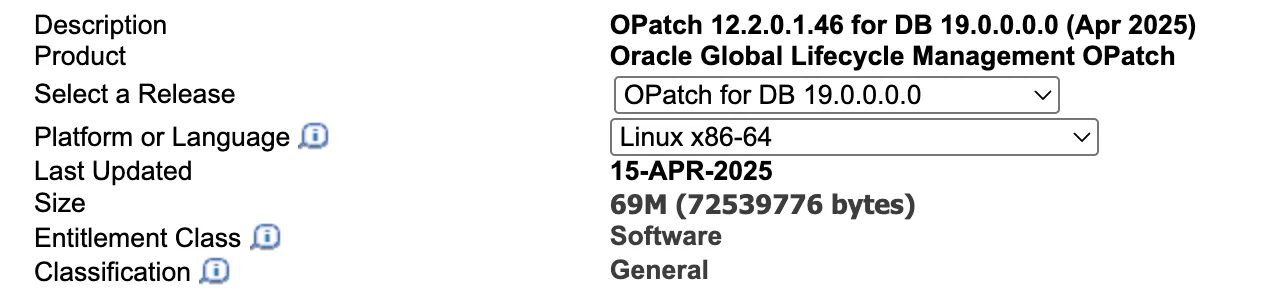
下载后上传到数据库主机,解压替换即可(这一步不需要停机,可以在线操作):
1## 这里我上传到 /soft 目录,所以需要对目录进行授权2[root@oel8:/root]# chown -R oracle:oinstall /soft/34## oracle 用户静默解压 opatch 到 ORACLE_HOME 目录下5[oracle@oel8:/home/oracle]$ cd /soft/6[oracle@oel8:/soft]$ unzip -qo p6880880_190000_Linux-x86-64.zip -d $ORACLE_HOME78## 查看替换后的 OPatch 版本9[oracle@oel8:/soft]$ opatch version10OPatch Version: 12.2.0.1.461112OPatch succeeded.升级完 OPatch 版本之后,需要进行安装前补丁冲突检查。
首先需要上传 RU 补丁并解压:
1## 这里我上传到 /soft 目录,所以需要对目录进行授权2[root@oel8:/root]# chown -R oracle:oinstall /soft/34## oracle 用户静默解压 RU 补丁包5[oracle@oel8:/soft]$ unzip -q p37642901_190000_Linux-x86-64.zip6[oracle@oel8:/soft]$ cd 37642901/78## 检查冲突,一般是没有问题的9[oracle@oel8:/soft/37642901]$ opatch prereq CheckConflictAgainstOHWithDetail -ph ./10Oracle Interim Patch Installer version 12.2.0.1.4611Copyright (c) 2025, Oracle Corporation. All rights reserved.1213PREREQ session1415Oracle Home : /u01/app/oracle/product/19.3.0/db16Central Inventory : /u01/app/oraInventory17 from : /u01/app/oracle/product/19.3.0/db/oraInst.loc18OPatch version : 12.2.0.1.4619OUI version : 12.2.0.7.020Log file location : /u01/app/oracle/product/19.3.0/db/cfgtoollogs/opatch/opatch2025-04-18_12-20-11PM_1.log2122Invoking prereq "checkconflictagainstohwithdetail"2324Prereq "checkConflictAgainstOHWithDetail" passed.2526OPatch succeeded.到这都没问题的话,就可以协商停机时间进行补丁升级了。
前置工作都做完之后,补丁升级步骤其实很简单,RAC 滚动升级也可以使用这种方式:
1## 关闭数据库2[oracle@oel8:/soft/37642901]$ sas34SQL*Plus: Release 19.0.0.0.0 - Production on Fri Apr 18 12:20:40 20255Version 19.3.0.0.067Copyright (c) 1982, 2019, Oracle. All rights reserved.8910Connected to:11Oracle Database 19c Enterprise Edition Release 19.0.0.0.0 - Production12Version 19.3.0.0.01314SYS@orclcdb SQL> shu immediate15Database closed.16Database dismounted.17ORACLE instance shut down.18SYS@orclcdb SQL> 1920## 关闭监听21[oracle@oel8:/soft/37642901]$ lsnrctl stop2223LSNRCTL for Linux: Version 19.0.0.0.0 - Production on 18-APR-2025 12:21:382425Copyright (c) 1991, 2019, Oracle. All rights reserved.2627Connecting to (DESCRIPTION=(ADDRESS=(PROTOCOL=TCP)(HOST=oel8)(PORT=1521)))28The command completed successfully2930## 静默安装补丁(确保没有 oracle 相关进程之后就可以安装补丁)31[oracle@oel8:/soft/37642901]$ opatch apply -silent32Oracle Interim Patch Installer version 12.2.0.1.4633Copyright (c) 2025, Oracle Corporation. All rights reserved.343536Oracle Home : /u01/app/oracle/product/19.3.0/db37Central Inventory : /u01/app/oraInventory38 from : /u01/app/oracle/product/19.3.0/db/oraInst.loc39OPatch version : 12.2.0.1.4640OUI version : 12.2.0.7.041Log file location : /u01/app/oracle/product/19.3.0/db/cfgtoollogs/opatch/opatch2025-04-18_12-21-58PM_1.log4243Verifying environment and performing prerequisite checks...44OPatch continues with these patches: 37642901 4546Do you want to proceed? [y|n]47Y (auto-answered by -silent)48User Responded with: Y49All checks passed.5051Please shutdown Oracle instances running out of this ORACLE_HOME on the local system.52(Oracle Home = '/u01/app/oracle/product/19.3.0/db')535455Is the local system ready for patching? [y|n]56Y (auto-answered by -silent)57User Responded with: Y58Backing up files...59Applying interim patch '37642901' to OH '/u01/app/oracle/product/19.3.0/db'60ApplySession: Optional component(s) [ oracle.network.gsm, 19.0.0.0.0 ] , [ oracle.assistants.asm, 19.0.0.0.0 ] , [ oracle.crypto.rsf, 19.0.0.0.0 ] , [ oracle.pg4appc, 19.0.0.0.0 ] , [ oracle.pg4mq, 19.0.0.0.0 ] , [ oracle.oraolap.mgmt, 19.0.0.0.0 ] , [ oracle.precomp.companion, 19.0.0.0.0 ] , [ oracle.rdbms.ic, 19.0.0.0.0 ] , [ oracle.rdbms.tg4db2, 19.0.0.0.0 ] , [ oracle.sdo.companion, 19.0.0.0.0 ] , [ oracle.tfa, 19.0.0.0.0 ] , [ oracle.ons.cclient, 19.0.0.0.0 ] , [ oracle.options.olap, 19.0.0.0.0 ] , [ oracle.ons.eons.bwcompat, 19.0.0.0.0 ] , [ oracle.options.olap.api, 19.0.0.0.0 ] , [ oracle.network.cman, 19.0.0.0.0 ] , [ oracle.rdbms.tg4sybs, 19.0.0.0.0 ] , [ oracle.rdbms.tg4tera, 19.0.0.0.0 ] , [ oracle.oid.client, 19.0.0.0.0 ] , [ oracle.ldap.ztk, 19.0.0.0.0 ] , [ oracle.java.sqlj.sqljruntime, 19.0.0.0.0 ] , [ oracle.net.cman, 19.0.0.0.0 ] , [ oracle.xdk.companion, 19.0.0.0.0 ] , [ oracle.rdbms.tg4msql, 19.0.0.0.0 ] , [ oracle.rdbms.tg4ifmx, 19.0.0.0.0 ] , [ oracle.jdk, 1.8.0.191.0 ] , [ oracle.jdk, 1.8.0.391.11 ] not present in the Oracle Home or a higher version is found.6162Patching component oracle.rdbms, 19.0.0.0.0...6364Patching component oracle.rdbms.util, 19.0.0.0.0...6566Patching component oracle.rdbms.rsf, 19.0.0.0.0...6768Patching component oracle.assistants.acf, 19.0.0.0.0...6970Patching component oracle.assistants.deconfig, 19.0.0.0.0...7172Patching component oracle.assistants.server, 19.0.0.0.0...7374Patching component oracle.blaslapack, 19.0.0.0.0...7576Patching component oracle.buildtools.rsf, 19.0.0.0.0...7778Patching component oracle.ctx, 19.0.0.0.0...7980Patching component oracle.dbdev, 19.0.0.0.0...8182Patching component oracle.dbjava.ic, 19.0.0.0.0...8384Patching component oracle.dbjava.jdbc, 19.0.0.0.0...8586Patching component oracle.dbjava.ucp, 19.0.0.0.0...8788Patching component oracle.duma, 19.0.0.0.0...8990Patching component oracle.javavm.client, 19.0.0.0.0...9192Patching component oracle.ldap.owm, 19.0.0.0.0...9394Patching component oracle.ldap.rsf, 19.0.0.0.0...9596Patching component oracle.ldap.security.osdt, 19.0.0.0.0...9798Patching component oracle.marvel, 19.0.0.0.0...99100Patching component oracle.network.rsf, 19.0.0.0.0...101102Patching component oracle.odbc.ic, 19.0.0.0.0...103104Patching component oracle.ons, 19.0.0.0.0...105106Patching component oracle.ons.ic, 19.0.0.0.0...107108Patching component oracle.oracore.rsf, 19.0.0.0.0...109110Patching component oracle.perlint, 5.28.1.0.0...111112Patching component oracle.precomp.common.core, 19.0.0.0.0...113114Patching component oracle.precomp.rsf, 19.0.0.0.0...115116Patching component oracle.rdbms.crs, 19.0.0.0.0...117118Patching component oracle.rdbms.dbscripts, 19.0.0.0.0...119120Patching component oracle.rdbms.deconfig, 19.0.0.0.0...121122Patching component oracle.rdbms.oci, 19.0.0.0.0...123124Patching component oracle.rdbms.rsf.ic, 19.0.0.0.0...125126Patching component oracle.rdbms.scheduler, 19.0.0.0.0...127128Patching component oracle.rhp.db, 19.0.0.0.0...129130Patching component oracle.rsf, 19.0.0.0.0...131132Patching component oracle.sdo, 19.0.0.0.0...133134Patching component oracle.sdo.locator.jrf, 19.0.0.0.0...135136Patching component oracle.sqlplus, 19.0.0.0.0...137138Patching component oracle.sqlplus.ic, 19.0.0.0.0...139140Patching component oracle.sqlj.sqljruntime, 19.0.0.0.0...141142Patching component oracle.tfa.db, 19.0.0.0.0...143144Patching component oracle.wwg.plsql, 19.0.0.0.0...145146Patching component oracle.xdk.rsf, 19.0.0.0.0...147148Patching component oracle.ldap.client, 19.0.0.0.0...149150Patching component oracle.ldap.ssl, 19.0.0.0.0...151152Patching component oracle.nlsrtl.rsf.core, 19.0.0.0.0...153154Patching component oracle.oraolap.dbscripts, 19.0.0.0.0...155156Patching component oracle.mgw.common, 19.0.0.0.0...157158Patching component oracle.rdbms.install.plugins, 19.0.0.0.0...159160Patching component oracle.ldap.rsf.ic, 19.0.0.0.0...161162Patching component oracle.javavm.server, 19.0.0.0.0...163164Patching component oracle.ovm, 19.0.0.0.0...165166Patching component oracle.rdbms.locator, 19.0.0.0.0...167168Patching component oracle.xdk.parser.java, 19.0.0.0.0...169170Patching component oracle.oraolap.api, 19.0.0.0.0...171172Patching component oracle.nlsrtl.rsf.lbuilder, 19.0.0.0.0...173174Patching component oracle.rdbms.lbac, 19.0.0.0.0...175176Patching component oracle.ctx.rsf, 19.0.0.0.0...177178Patching component oracle.rdbms.install.common, 19.0.0.0.0...179180Patching component oracle.network.listener, 19.0.0.0.0...181182Patching component oracle.xdk.xquery, 19.0.0.0.0...183184Patching component oracle.odbc, 19.0.0.0.0...185186Patching component oracle.ctx.atg, 19.0.0.0.0...187188Patching component oracle.rdbms.hs_common, 19.0.0.0.0...189190Patching component oracle.oraolap, 19.0.0.0.0...191192Patching component oracle.network.aso, 19.0.0.0.0...193194Patching component oracle.nlsrtl.rsf, 19.0.0.0.0...195196Patching component oracle.nlsrtl.rsf.core, 19.0.0.0.0...197198Patching component oracle.nlsrtl.rsf.ic, 19.0.0.0.0...199200Patching component oracle.dbtoolslistener, 19.0.0.0.0...201202Patching component oracle.rdbms.rman, 19.0.0.0.0...203204Patching component oracle.xdk, 19.0.0.0.0...205206Patching component oracle.rdbms.drdaas, 19.0.0.0.0...207208Patching component oracle.rdbms.hsodbc, 19.0.0.0.0...209210Patching component oracle.network.client, 19.0.0.0.0...211212Patching component oracle.rdbms.dm, 19.0.0.0.0...213214Patching component oracle.sdo.locator, 19.0.0.0.0...215216Patching component oracle.rdbms.dv, 19.0.0.0.0...217218Patching component oracle.rdbms.rat, 19.0.0.0.0...219220Patching component oracle.install.deinstalltool, 19.0.0.0.0...221222Patching component oracle.precomp.lang, 19.0.0.0.0...223224Patching component oracle.precomp.common, 19.0.0.0.0...225226Patching component oracle.jdk, 1.8.0.201.0...227Patch 37642901 successfully applied.228Sub-set patch [29517242] has become inactive due to the application of a super-set patch [37642901].229Please refer to Doc ID 2161861.1 for any possible further required actions.230Log file location: /u01/app/oracle/product/19.3.0/db/cfgtoollogs/opatch/opatch2025-04-18_12-21-58PM_1.log231232OPatch succeeded.19.27 RU 补丁安装比较慢,要耐心等待,这里安装完最后还有一个提示(这个是正常的提示,可以忽略):
1Sub-set patch [29517242] has become inactive due to the application of a super-set patch [37642901].2Please refer to Doc ID 2161861.1 for any possible further required actions.这个 29517242 补丁就是我们安装好 19C 数据库之后默认安装的补丁版本:
129517242;Database Release Update : 19.3.0.0.190416 (29517242)通过查看相关文档可以发现:
1For information about Release Updates please read Note:2285040.1 .2The new RUs will be a superset of a previous RU patches.34## Note:2285040.1 About list5It is possible to move back and forth from Updates to Revisions*. However, there are some restrictions as the new patch level must be a super set of the previous. To avoid surprises with patch conflicts, customers should aim to stick to a consistent policy of always taking the same Revision level (i.e. Release.Update.0, Release.Update.1 or Release.Update.2) for their quarterly maintenance cycles.软件补丁安装完成后,对数据库也要执行 datapatch,需要先打开数据库:
1[oracle@oel8:/home/oracle]$ sas23SQL*Plus: Release 19.0.0.0.0 - Production on Fri Apr 18 12:37:43 20254Version 19.27.0.0.056Copyright (c) 1982, 2024, Oracle. All rights reserved.78Connected to an idle instance.910SYS@orclcdb SQL> startup11ORACLE instance started.1213Total System Global Area 5335151640 bytes14Fixed Size 9192472 bytes15Variable Size 905969664 bytes16Database Buffers 4412407808 bytes17Redo Buffers 7581696 bytes18Database mounted.19Database opened.20SYS@orclcdb SQL> show pdbs2122 CON_ID CON_NAME OPEN MODE RESTRICTED23---------- ------------------------------ ---------- ----------24 2 PDB$SEED READ ONLY NO25 3 LUCIFER READ WRITE NO2627## 这里是 CDB 架构,所以需要打开 PDB(如果配置了 PDB 随 CDB 自启,则跳过这一步,安装脚本默认配置了)28SQL> alter pluggable database all open;2930SYS@orclcdb SQL> exit31Disconnected from Oracle Database 19c Enterprise Edition Release 19.0.0.0.0 - Production32Version 19.27.0.0.0执行 datapatch:
1## 这一步是可选的,执行后会运行一系列环境和数据库检查,确保 datapatch 能够安装成功2[oracle@oel8:/home/oracle]$ datapatch -sanity_checks3SQL Patching sanity checks version 19.27.0.0.0 on Fri 18 Apr 2025 12:38:51 PM CST4Copyright (c) 2021, 2025, Oracle. All rights reserved.56Log file for this invocation: /u01/app/oracle/cfgtoollogs/sqlpatch/sanity_checks_20250418_123851_7726/sanity_checks_20250418_123851_7726.log78Running checks9JSON report generated in /u01/app/oracle/cfgtoollogs/sqlpatch/sanity_checks_20250418_123851_7726/sqlpatch_sanity_checks_summary.json file10Checks completed. Printing report:1112Check: Database component status - OK13Check: PDB Violations - OK14Check: Invalid System Objects - OK15Check: Tablespace Status - OK16Check: Backup jobs - OK17Check: Temp file exists - OK18Check: Temp file online - OK19Check: Data Pump running - OK20Check: Container status - OK21Check: Oracle Database Keystore - OK22Check: Dictionary statistics gathering - OK23Check: Scheduled Jobs - OK24Check: GoldenGate triggers - OK25Check: Logminer DDL triggers - OK26Check: Check sys public grants - OK27Check: Statistics gathering running - OK28Check: Optim dictionary upgrade parameter - OK29Check: Symlinks on oracle home path - OK30Check: Central Inventory - OK31Check: Queryable Inventory dba directories - OK32Check: Queryable Inventory locks - OK33Check: Queryable Inventory package - ERROR34 CDB$ROOT:35 Error when getting clob length 'select dbms_lob.getlength(XMLSerialize(CONTENT dbms_qopatch.get_pending_activity INDENT)) from dual':36 ORA-20001: Latest xml inventory is not loaded into table37ORA-06512: at "SYS.DBMS_QOPATCH", line 209638ORA-06512: at "SYS.DBMS_QOPATCH", line 85439ORA-06512: at "SYS.DBMS_QOPATCH", line 93740ORA-06510: PL/SQL: unhandled user-defined exception41ORA-06512: at "SYS.DBMS_QOPATCH", line 93242ORA-29913: error in executing ODCIEXTTABLEFETCH callout43ORA-29400: data cartridge error44KUP-04020: found record longer than buffer size supported, 8388608, in /u01/app/oracle/product/19.3.0/db/QOpatch/qopiprep.bat (offset=0)45ORA-06512: at "SYS.DBMS_QOPATCH", line 91946ORA-06512: at "SYS.DBMS_QOPATCH", line 228647ORA-06512: at "SYS.DBMS_QOPATCH", line 81748ORA-06512: at "SYS.DBMS_QOPATCH", line 2041 (DBD ERROR: error possibly near <*> indicator at char 47 in 'select dbms_lob.getlength(XMLSerialize(CONTENT <*>dbms_qopatch.get_pending_activity INDENT)) from dual')4950Check: Queryable Inventory external table - SKIPPED (ERROR)51 Message: Skipped as previous check wasn't executed successfully.52Check: Imperva processes - OK53Check: Guardium processes - OK54Check: Locale - OK5556Refer to MOS Note 2975965.1 and debug log57/u01/app/oracle/cfgtoollogs/sqlpatch/sanity_checks_20250418_123851_7726/sanity_checks_debug_20250418_123851_7726.log5859SQL Patching sanity checks completed on Fri 18 Apr 2025 12:39:06 PM CST这里在执行检查的时候报错:
1Check: Queryable Inventory package - ERROR2 CDB$ROOT:3 Error when getting clob length 'select dbms_lob.getlength(XMLSerialize(CONTENT dbms_qopatch.get_pending_activity INDENT)) from dual':4 ORA-20001: Latest xml inventory is not loaded into table5ORA-06512: at "SYS.DBMS_QOPATCH", line 20966ORA-06512: at "SYS.DBMS_QOPATCH", line 8547ORA-06512: at "SYS.DBMS_QOPATCH", line 9378ORA-06510: PL/SQL: unhandled user-defined exception9ORA-06512: at "SYS.DBMS_QOPATCH", line 93210ORA-29913: error in executing ODCIEXTTABLEFETCH callout11ORA-29400: data cartridge error12KUP-04020: found record longer than buffer size supported, 8388608, in /u01/app/oracle/product/19.3.0/db/QOpatch/qopiprep.bat (offset=0)13ORA-06512: at "SYS.DBMS_QOPATCH", line 91914ORA-06512: at "SYS.DBMS_QOPATCH", line 228615ORA-06512: at "SYS.DBMS_QOPATCH", line 81716ORA-06512: at "SYS.DBMS_QOPATCH", line 2041 (DBD ERROR: error possibly near <*> indicator at char 47 in 'select dbms_lob.getlength(XMLSerialize(CONTENT <*>dbms_qopatch.get_pending_activity INDENT)) from dual')1718Check: Queryable Inventory external table - SKIPPED (ERROR)通过 MOS 可以查询到:Datapatch -sanity_checks Fails with Error "Queryable Inventory package - ERROR" (Doc ID 3055606.1)
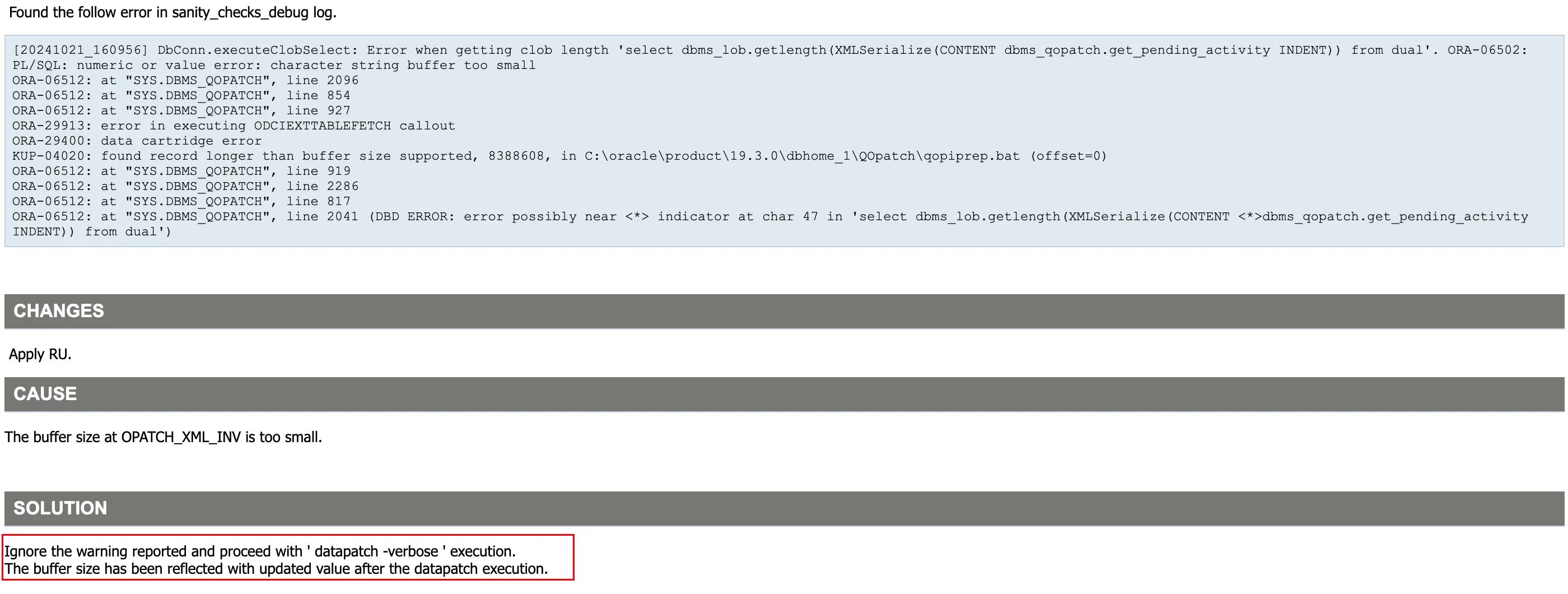
这个报错可以无视,继续执行 datapatch:
1[oracle@oel8:/home/oracle]$ datapatch -verbose2SQL Patching tool version 19.27.0.0.0 Production on Fri Apr 18 12:53:53 20253Copyright (c) 2012, 2025, Oracle. All rights reserved.45Log file for this invocation: /u01/app/oracle/cfgtoollogs/sqlpatch/sqlpatch_8139_2025_04_18_12_53_53/sqlpatch_invocation.log67Connecting to database...OK8Gathering database info...done910Note: Datapatch will only apply or rollback SQL fixes for PDBs11 that are in an open state, no patches will be applied to closed PDBs.12 Please refer to Note: Datapatch: Database 12c Post Patch SQL Automation13 (Doc ID 1585822.1)1415Bootstrapping registry and package to current versions...done16Determining current state...done1718Current state of interim SQL patches:19 No interim patches found2021Current state of release update SQL patches:22 Binary registry:23 19.27.0.0.0 Release_Update 250406131139: Installed24 PDB CDB$ROOT:25 Applied 19.3.0.0.0 Release_Update 190410122720 successfully on 18-APR-25 11.36.23.988796 AM26 PDB LUCIFER:27 Applied 19.3.0.0.0 Release_Update 190410122720 successfully on 18-APR-25 11.43.49.009329 AM28 PDB PDB$SEED:29 Applied 19.3.0.0.0 Release_Update 190410122720 successfully on 18-APR-25 11.43.49.009329 AM3031Adding patches to installation queue and performing prereq checks...done32Installation queue:33 For the following PDBs: CDB$ROOT PDB$SEED LUCIFER34 No interim patches need to be rolled back35 Patch 37642901 (Database Release Update : 19.27.0.0.250415 (37642901)):36 Apply from 19.3.0.0.0 Release_Update 190410122720 to 19.27.0.0.0 Release_Update 25040613113937 No interim patches need to be applied3839Installing patches...40Patch installation complete. Total patches installed: 34142Validating logfiles...done43Patch 37642901 apply (pdb CDB$ROOT): SUCCESS44 logfile: /u01/app/oracle/cfgtoollogs/sqlpatch/37642901/27123174/37642901_apply_ORCLCDB_CDBROOT_2025Apr18_12_55_25.log (no errors)45Patch 37642901 apply (pdb PDB$SEED): SUCCESS46 logfile: /u01/app/oracle/cfgtoollogs/sqlpatch/37642901/27123174/37642901_apply_ORCLCDB_PDBSEED_2025Apr18_13_04_28.log (no errors)47Patch 37642901 apply (pdb LUCIFER): SUCCESS48 logfile: /u01/app/oracle/cfgtoollogs/sqlpatch/37642901/27123174/37642901_apply_ORCLCDB_LUCIFER_2025Apr18_13_04_27.log (no errors)49SQL Patching tool complete on Fri Apr 18 13:11:41 2025启动监听:
1[oracle@oel8:/home/oracle]$ lsnrctl start23LSNRCTL for Linux: Version 19.0.0.0.0 - Production on 18-APR-2025 13:19:0645Copyright (c) 1991, 2025, Oracle. All rights reserved.67Starting /u01/app/oracle/product/19.3.0/db/bin/tnslsnr: please wait...89TNSLSNR for Linux: Version 19.0.0.0.0 - Production10System parameter file is /u01/app/oracle/product/19.3.0/db/network/admin/listener.ora11Log messages written to /u01/app/oracle/diag/tnslsnr/oel8/listener/alert/log.xml12Listening on: (DESCRIPTION=(ADDRESS=(PROTOCOL=tcp)(HOST=oel8)(PORT=1521)))13Listening on: (DESCRIPTION=(ADDRESS=(PROTOCOL=ipc)(KEY=EXTPROC1521)))1415Connecting to (DESCRIPTION=(ADDRESS=(PROTOCOL=TCP)(HOST=oel8)(PORT=1521)))16STATUS of the LISTENER17------------------------18Alias LISTENER19Version TNSLSNR for Linux: Version 19.0.0.0.0 - Production20Start Date 18-APR-2025 13:19:0621Uptime 0 days 0 hr. 0 min. 0 sec22Trace Level off23Security ON: Local OS Authentication24SNMP OFF25Listener Parameter File /u01/app/oracle/product/19.3.0/db/network/admin/listener.ora26Listener Log File /u01/app/oracle/diag/tnslsnr/oel8/listener/alert/log.xml27Listening Endpoints Summary...28 (DESCRIPTION=(ADDRESS=(PROTOCOL=tcp)(HOST=oel8)(PORT=1521)))29 (DESCRIPTION=(ADDRESS=(PROTOCOL=ipc)(KEY=EXTPROC1521)))30The listener supports no services31The command completed successfully查看补丁版本:
1[oracle@oel8:/home/oracle]$ sqlplus -V23SQL*Plus: Release 19.0.0.0.0 - Production4Version 19.27.0.0.056[oracle@oel8:/home/oracle]$ opatch lspatches737642901;Database Release Update : 19.27.0.0.250415 (37642901)829585399;OCW RELEASE UPDATE 19.3.0.0.0 (29585399)910OPatch succeeded.至此,数据库 19.27 补丁安装完成。
如果你是新安装一套数据库,需要安装最新补丁 19.27,使用 Oracle 一键安装脚本可以轻松完成。
脚本下载:Oracle一键安装脚本
作者微信:Lucifer-0622
这里演示一下 19C 一键安装,同时安装 DB 和 OJVM 补丁的命令:
1# 提前上传好安装包和安装脚本即可2[root@oel8 soft]# ll3-rwx------. 1 root root 3059705302 Apr 18 11:03 LINUX.X64_193000_db_home.zip4-rwxr-xr-x. 1 root root 245190 Apr 18 11:02 OracleShellInstall5-rwxr-xr-x. 1 root root 129182987 Apr 18 11:01 p37499406_190000_Linux-x86-64.zip6-rwxr-xr-x. 1 root root 2284324377 Apr 18 11:02 p37642901_190000_Linux-x86-64.zip7-rwxr-xr-x. 1 root root 72539776 Apr 18 11:01 p6880880_190000_Linux-x86-64.zip8-rwxr-xr-x. 1 root root 321590 Apr 18 11:02 rlwrap-0.44.tar.gz910# 执行一键安装命令11[root@oel8 soft]# ./OracleShellInstall -lf ens33 `# local ip ifname`\12-n oel8 `# hostname`\13-op oracle `# oracle password`\14-d /u01 `# software base dir`\15-ord /oradata `# data dir`\16-o orclcdb `# dbname`\17-pdb lucifer `# pdbname`\18-dp oracle `# sys/system password`\19-ds AL32UTF8 `# database character`\20-ns AL16UTF16 `# national character`\21-redo 100 `# redo size`\22-opa 37642901 `# oracle PSU/RU`\23-jpa 37499406 `# OJVM PSU/RU`\24-opd Y `# optimize db`默认使用专业版脚本。脚本下载:ora100.com/shell-install 安装过程如下:
1 ███████ ██ ████████ ██ ██ ██ ██ ██ ██ ██2 ██░░░░░██ ░██ ██░░░░░░ ░██ ░██ ░██░██ ░██ ░██ ░██3 ██ ░░██ ██████ ██████ █████ ░██ █████ ░██ ░██ █████ ░██ ░██░██ ███████ ██████ ██████ ██████ ░██ ░██4░██ ░██░░██░░█ ░░░░░░██ ██░░░██ ░██ ██░░░██░█████████░██████ ██░░░██ ░██ ░██░██░░██░░░██ ██░░░░ ░░░██░ ░░░░░░██ ░██ ░██5░██ ░██ ░██ ░ ███████ ░██ ░░ ░██░███████░░░░░░░░██░██░░░██░███████ ░██ ░██░██ ░██ ░██░░█████ ░██ ███████ ░██ ░██6░░██ ██ ░██ ██░░░░██ ░██ ██ ░██░██░░░░ ░██░██ ░██░██░░░░ ░██ ░██░██ ░██ ░██ ░░░░░██ ░██ ██░░░░██ ░██ ░██7 ░░███████ ░███ ░░████████░░█████ ███░░██████ ████████ ░██ ░██░░██████ ███ ███░██ ███ ░██ ██████ ░░██ ░░████████ ███ ███8 ░░░░░░░ ░░░ ░░░░░░░░ ░░░░░ ░░░ ░░░░░░ ░░░░░░░░ ░░ ░░ ░░░░░░ ░░░ ░░░ ░░ ░░░ ░░ ░░░░░░ ░░ ░░░░░░░░ ░░░ ░░░ 91011注意:本脚本仅用于新服务器上实施部署数据库使用,严禁在已运行数据库的主机上执行,以免发生数据丢失或者损坏,造成不可挽回的损失!!! 1213请选择安装模式 [单机(si)/单机ASM(sa)/集群(rac)] : si1415数据库安装模式: single 1617请选择数据库版本 [11|12|19|21|23] : 191819数据库版本: 19 2021OracleShellInstall 开始安装,详细安装过程可查看日志: tail -2000f /soft/print_shell_install_20250418131853.log 2223正在进行安装前检查,请稍等...... 2425正在检测安装包 /soft/LINUX.X64_193000_db_home.zip 的 MD5 值是否正确,请稍等...... 2627正在配置本地软件源......已完成 (耗时: 0 秒)28正在获取操作系统信息......已完成 (耗时: 1 秒)29正在安装依赖包......已完成 (耗时: 105 秒)30正在禁用防火墙......已完成 (耗时: 1 秒)31正在禁用 selinux......已完成 (耗时: 2 秒)32正在配置 nsyctl......已完成 (耗时: 0 秒)33正在配置主机名和 hosts 文件......已完成 (耗时: 0 秒)34正在创建用户和组......已完成 (耗时: 1 秒)35正在创建安装目录......已完成 (耗时: 1 秒)36正在配置 Avahi-daemon 服务......已完成 (耗时: 1 秒)37正在配置透明大页 && NUMA && 磁盘 IO 调度器......已完成 (耗时: 2 秒)38正在配置操作系统参数 sysctl......已完成 (耗时: 1 秒)39正在配置 RemoveIPC......已完成 (耗时: 1 秒)40正在配置用户限制 limit......已完成 (耗时: 1 秒)41正在配置 shm 目录......已完成 (耗时: 0 秒)42正在安装 rlwrap 插件......已完成 (耗时: 13 秒)43正在配置用户环境变量......已完成 (耗时: 1 秒)44正在解压 Oracle 安装包以及补丁......已完成 (耗时: 120 秒)45正在安装 Oracle 软件以及补丁......已完成 (耗时: 974 秒)46正在创建监听......已完成 (耗时: 3 秒)47正在创建数据库......已完成 (耗时: 1870 秒)48正在优化数据库......已完成 (耗时: 13 秒)4950恭喜!Oracle 一键安装执行完成 (耗时: 3118 秒),现在是否重启主机:[Y/N] Y5152正在重启当前节点主机......默认使用专业版脚本。脚本下载:ora100.com/shell-install 打补丁 + CDB 架构安装还是比较慢的,查看安装后的版本信息:
1[oracle@oel8:/home/oracle]$ sqlplus -V23SQL*Plus: Release 19.0.0.0.0 - Production4Version 19.27.0.0.056[oracle@oel8:/home/oracle]$ opatch lspatches737499406;OJVM RELEASE UPDATE: 19.27.0.0.250415 (37499406)837642901;Database Release Update : 19.27.0.0.250415 (37642901)929585399;OCW RELEASE UPDATE 19.3.0.0.0 (29585399)1011OPatch succeeded.可以看到数据库补丁以及 OJVM 补丁均已成功安装,数据库内部也可以查看补丁安装记录:
1SQL> set line2222 pages1000 tab off2col comments for a803col version for a304col action for a205SELECT con_id,6 comments,7 version,8 action,9 action_time10 FROM cdb_registry_history11 ORDER BY con_id;1213 CON_ID COMMENTS VERSION ACTION ACTION_TIME14---------- -------------------------------------------------------------------------------- ------------------------------ -------------------- ---------------------------------------------------------------------------15 1 RDBMS_19.27.0.0.0DBRU_LINUX.X64_250405 19 BOOTSTRAP16 1 Patch applied from 19.3.0.0.0 to 19.27.0.0.0: Release_Update - 250406131139 19.0.0.0.0 RU_APPLY 18-APR-25 01.54.55.239273 PM17 1 OJVM RU post-install 19.27.0.0.250415OJVMRU APPLY 18-APR-25 01.44.07.116272 PM18 1 RAN jvmpsu.sql 19.27.0.0.250415OJVMRU jvmpsu.sql 18-APR-25 01.44.07.082014 PM19 3 RDBMS_19.27.0.0.0DBRU_LINUX.X64_250405 19 BOOTSTRAP20 3 Patch applied from 19.3.0.0.0 to 19.27.0.0.0: Release_Update - 250406131139 19.0.0.0.0 RU_APPLY 18-APR-25 02.07.25.510690 PM21 3 OJVM RU post-install 19.27.0.0.250415OJVMRU APPLY 18-APR-25 02.00.05.480527 PM22 3 RAN jvmpsu.sql 19.27.0.0.250415OJVMRU jvmpsu.sql 18-APR-25 02.00.05.437234 PM23248 rows selected.至此,Oracle 一键安装演示结束。
Oracle 数据库补丁安装其实并不难,官方提供的 README 已经一目了然,如果大家都可以耐心好好读一读,相信一定会受益匪浅。